ruoyi集成minio文件存储服务
一、添加依赖
ruoyi-common/pom.xml文件添加minio依赖。
1
2
3
4
5
6
| <!-- Minio 文件存储 -->
<dependency>
<groupId>io.minio</groupId>
<artifactId>minio</artifactId>
<version>8.2.1</version>
</dependency>
|
二、添加minio配置
ruoyi-admin文件application.yml,添加minio配置
1
2
3
4
5
6
| # Minio配置
minio:
url: http://localhost:9000
accessKey: minioadmin
secretKey: minioadmin
bucketName: ruoyi
|
三、添加相关代码
1.添加配置文件MinioConfig.java
文件位置package com.ruoyi.common.config; 和RuoyiConfig.java在一块
文件内容:
 1
 2
 3
 4
 5
 6
 7
 8
 9
10
11
12
13
14
15
16
17
18
19
20
21
22
23
24
25
26
27
28
29
30
31
32
33
34
35
36
37
38
39
40
41
42
43
44
45
46
47
48
49
50
51
52
53
54
55
56
57
58
59
60
61
62
63
64
65
66
67
68
69
70
71
72
73
74
75
76
77
78
79
80
81
82
| package com.ruoyi.common.config;
import org.springframework.boot.context.properties.ConfigurationProperties;
import org.springframework.context.annotation.Bean;
import org.springframework.context.annotation.Configuration;
import io.minio.MinioClient;
/**
* Minio 配置信息
*
* @author ruoyi
*/
@Configuration
@ConfigurationProperties(prefix = "minio")
public class MinioConfig
{
/**
* 服务地址
*/
private static String url;
/**
* 用户名
*/
private static String accessKey;
/**
* 密码
*/
private static String secretKey;
/**
* 存储桶名称
*/
private static String bucketName;
public static String getUrl()
{
return url;
}
public void setUrl(String url)
{
MinioConfig.url = url;
}
public static String getAccessKey()
{
return accessKey;
}
public void setAccessKey(String accessKey)
{
MinioConfig.accessKey = accessKey;
}
public static String getSecretKey()
{
return secretKey;
}
public void setSecretKey(String secretKey)
{
MinioConfig.secretKey = secretKey;
}
public static String getBucketName()
{
return bucketName;
}
public void setBucketName(String bucketName)
{
MinioConfig.bucketName = bucketName;
}
@Bean
public MinioClient getMinioClient()
{
return MinioClient.builder().endpoint(url).credentials(accessKey, secretKey).build();
}
}
|
2.添加MinioUtil.java工具类
文件位置package com.ruoyi.common.utils.file;
文件内容:
 1
 2
 3
 4
 5
 6
 7
 8
 9
10
11
12
13
14
15
16
17
18
19
20
21
22
23
24
25
26
27
28
29
30
31
32
33
34
35
36
37
38
39
40
41
42
43
| package com.ruoyi.common.utils.file;
import java.io.IOException;
import java.io.InputStream;
import org.springframework.web.multipart.MultipartFile;
import com.ruoyi.common.utils.ServletUtils;
import com.ruoyi.common.utils.spring.SpringUtils;
import io.minio.GetPresignedObjectUrlArgs;
import io.minio.MinioClient;
import io.minio.PutObjectArgs;
import io.minio.http.Method;
/**
* Minio 文件存储工具类
*
* @author ruoyi
*/
public class MinioUtil
{
/**
* 上传文件
*
* @param bucketName 桶名称
* @param fileName
* @throws IOException
*/
public static String uploadFile(String bucketName, String fileName, MultipartFile multipartFile) throws IOException
{
String url = "";
MinioClient minioClient = SpringUtils.getBean(MinioClient.class);
try (InputStream inputStream = multipartFile.getInputStream())
{
minioClient.putObject(PutObjectArgs.builder().bucket(bucketName).object(fileName).stream(inputStream, multipartFile.getSize(), -1).contentType(multipartFile.getContentType()).build());
url = minioClient.getPresignedObjectUrl(GetPresignedObjectUrlArgs.builder().bucket(bucketName).object(fileName).method(Method.GET).build());
url = url.substring(0, url.indexOf('?'));
return ServletUtils.urlDecode(url);
}
catch (Exception e)
{
throw new IOException(e.getMessage(), e);
}
}
}
|
3.修改FileUploadUtils.java文件上传工具类
文件位置:package com.ruoyi.common.utils.file;
要添加的内容
 1
 2
 3
 4
 5
 6
 7
 8
 9
10
11
12
13
14
15
16
17
18
19
20
21
22
23
24
25
26
27
28
29
30
31
32
33
34
35
36
37
38
39
40
41
42
43
44
45
46
47
48
49
50
51
52
53
54
55
56
57
58
59
60
61
62
63
64
65
66
67
68
69
70
|
    /**
     * Minio默认上传的地址
     */
    private static String bucketName = MinioConfig.getBucketName();

    public static String getBucketName()
    {
        return bucketName;
    }

        /**
     * 以默认BucketName配置上传到Minio服务器
     *
     * @param file 上传的文件
     * @return 文件名称
     * @throws Exception
     */
    public static final String uploadMinio(MultipartFile file) throws IOException
    {
        try
        {
            return uploadMinino(getBucketName(), file, MimeTypeUtils.DEFAULT_ALLOWED_EXTENSION);
        }
        catch (Exception e)
        {
            throw new IOException(e.getMessage(), e);
        }
    }

    /**
     * 自定义bucketName配置上传到Minio服务器
     *
     * @param file 上传的文件
     * @return 文件名称
     * @throws Exception
     */
    public static final String uploadMinio(MultipartFile file, String bucketName) throws IOException
    {
        try
        {
            return uploadMinino(bucketName, file, MimeTypeUtils.DEFAULT_ALLOWED_EXTENSION);
        }
        catch (Exception e)
        {
            throw new IOException(e.getMessage(), e);
        }
    }

    private static final String uploadMinino(String bucketName, MultipartFile file, String[] allowedExtension)
            throws FileSizeLimitExceededException, IOException, FileNameLengthLimitExceededException,
            InvalidExtensionException
    {
        int fileNamelength = file.getOriginalFilename().length();
        if (fileNamelength > FileUploadUtils.DEFAULT_FILE_NAME_LENGTH)
        {
            throw new FileNameLengthLimitExceededException(FileUploadUtils.DEFAULT_FILE_NAME_LENGTH);
        }
        assertAllowed(file, allowedExtension);
        try
        {
            String fileName = extractFilename(file);
            String pathFileName = MinioUtil.uploadFile(bucketName, fileName, file);
            return pathFileName;
        }
        catch (Exception e)
        {
            throw new IOException(e.getMessage(), e);
        }
    }
|
4.CommonController.java添加自定义Minio服务器上传请求
文件位置:package com.ruoyi.web.controller.common;
 1
 2
 3
 4
 5
 6
 7
 8
 9
10
11
12
13
14
15
16
17
18
19
20
21
22
23
24
|
/**
 * 自定义 Minio 服务器上传请求
 */
@PostMapping("/uploadMinio")
@ResponseBody
public AjaxResult uploadFileMinio(MultipartFile file) throws Exception
{
	try
	{
		// 上传并返回新文件名称
		String fileName = FileUploadUtils.uploadMinio(file);
		AjaxResult ajax = AjaxResult.success();
		ajax.put("url", fileName);
		ajax.put("fileName", fileName);
		ajax.put("newFileName", FileUtils.getName(fileName));
		ajax.put("originalFilename", file.getOriginalFilename());
		return ajax;
	}
	catch (Exception e)
	{
		return AjaxResult.error(e.getMessage());
	}
}
|
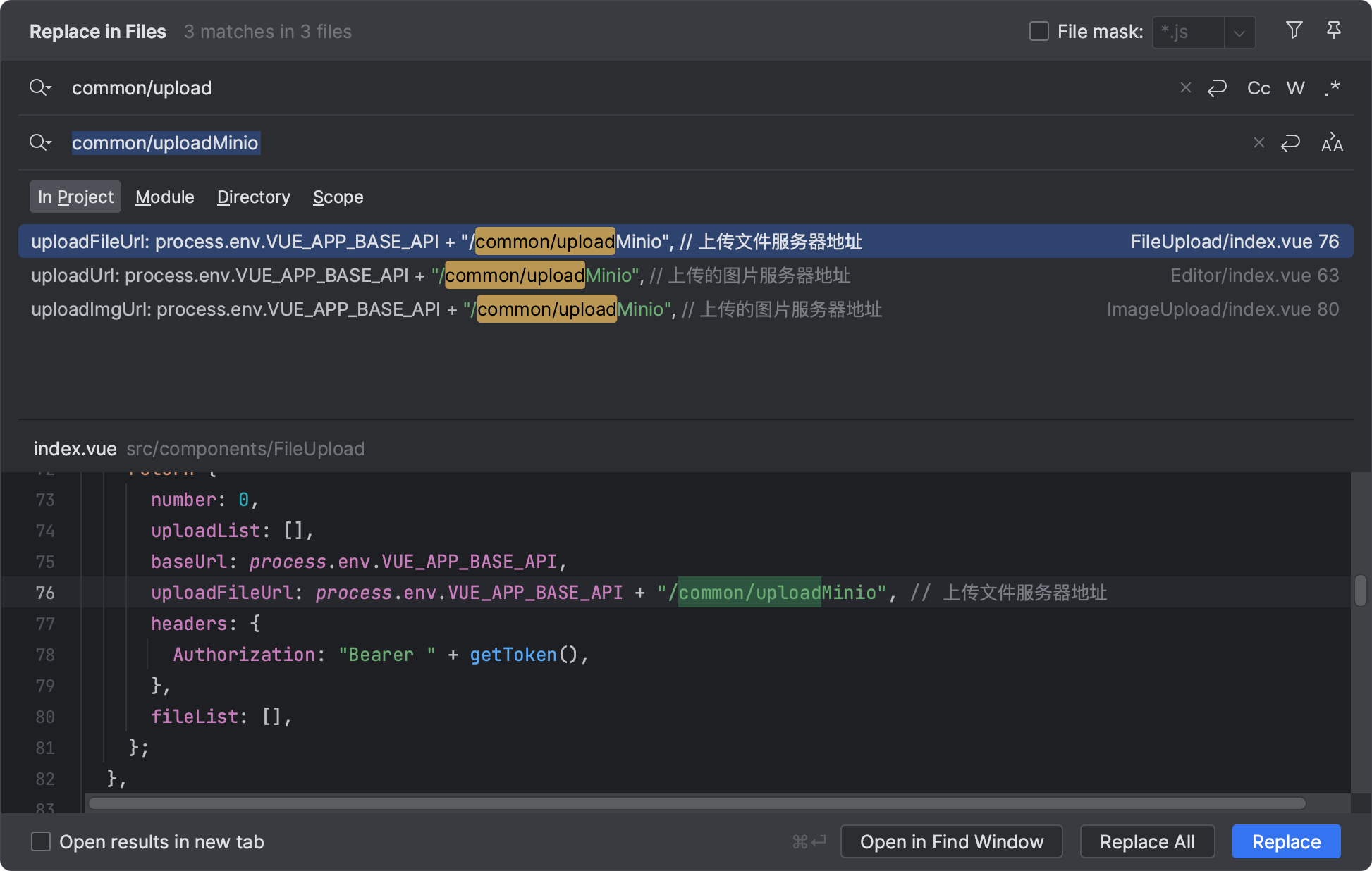
5.修改前端相关接口
全局替换common/upload为common/uploadMinio

上传问题进行测试,文件成功存储在minio服务器内!